
HOW IT WORKS

Build the music. Run the stream.

Marlonica turns a channel direction into original music, a branded visual loop, and a private-first YouTube Live broadcast you can make public when it is ready.

Stream settings

01OF 03

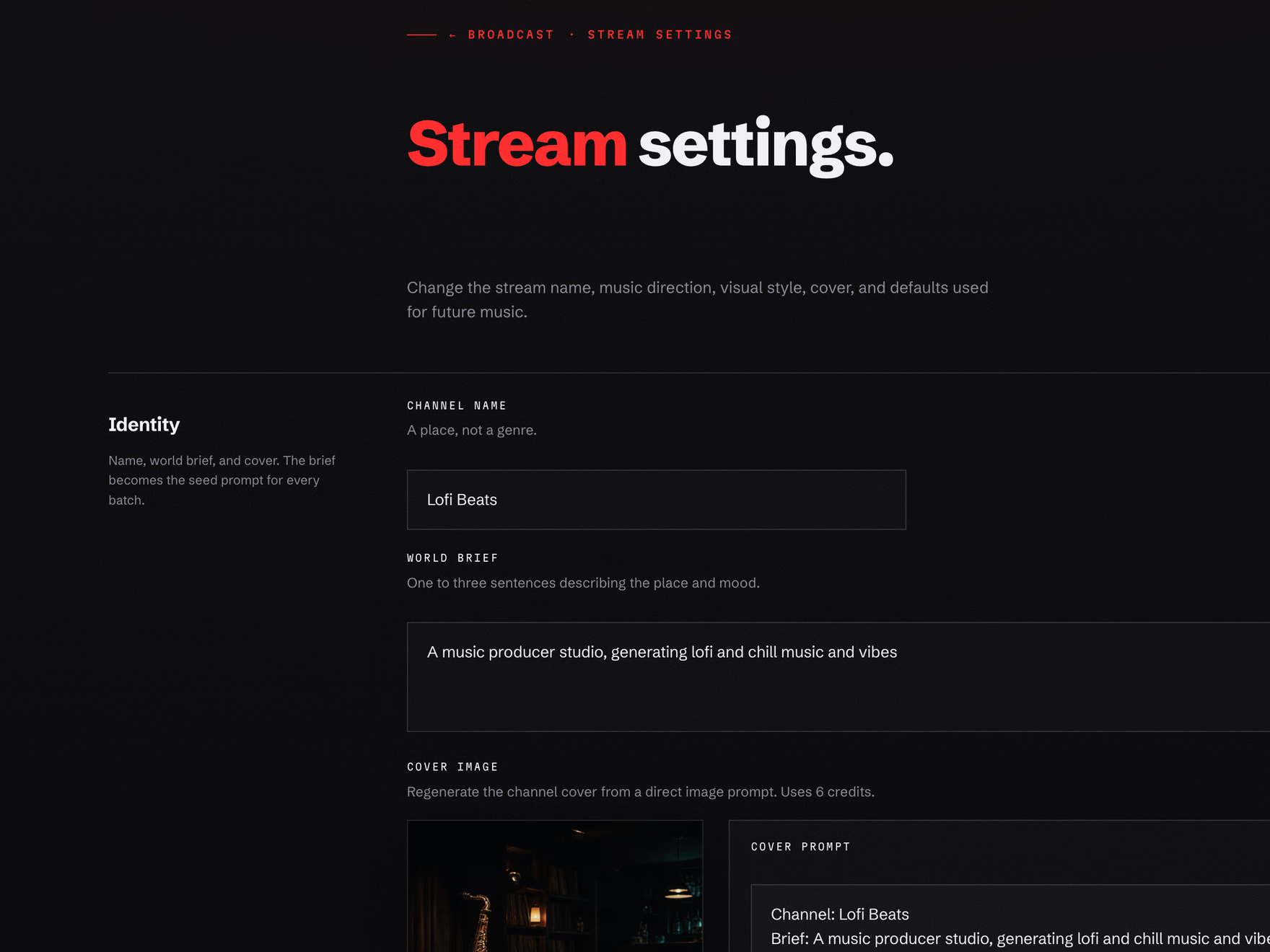
Shape the stream once.

Set the name, music direction, and visual style that future track thumbnails and broadcast visuals should respect.

  • One channel identity. Marlonica keeps the brief, genre tags, mood lanes, and visual language tied to the stream.
  • Editable defaults. You can adjust the direction later without rebuilding the whole product surface.
  • No production machinery. The operator sees creative controls; asset creation and launch checks stay behind the scenes.
Marlonica stream settings page showing identity, music direction, and visual style controls.
01Current stream settings

Music Library

02OF 03

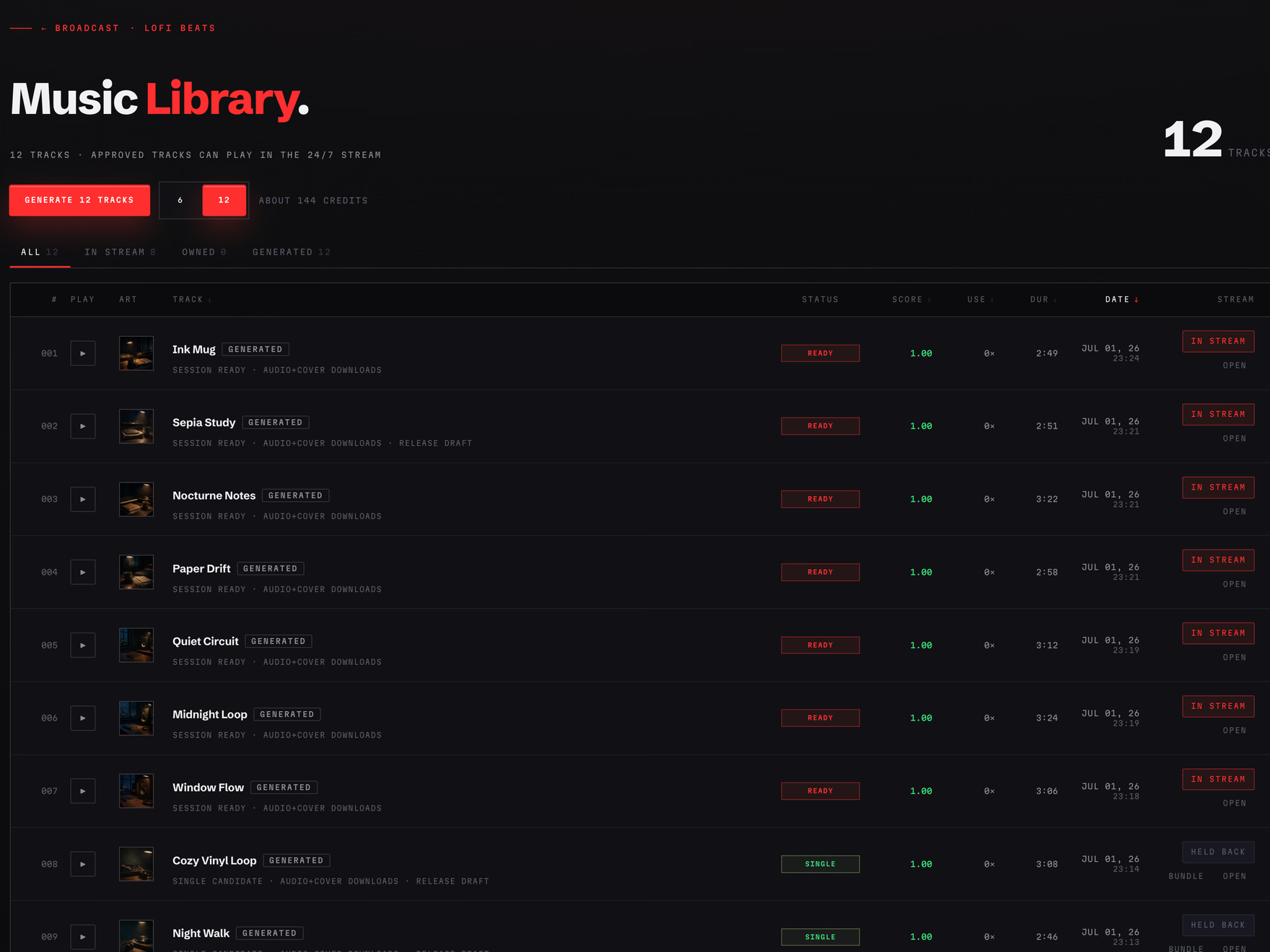
Build the music library.

Generate original tracks for the stream, then choose what airs. Approved tracks stay reusable and belong to the channel.

  • Stream-ready tracks. The table shows track status, score, duration, and whether each track is in the stream.
  • Hold back anything. The stream uses approved tracks by default, but you can hold back tracks that do not fit.
  • Credits make assets. Credits are for creating music and visuals; running the 24/7 stream is included with the plan.
Marlonica Music Library page with generated tracks and stream controls.
02Current Music Library

Broadcast

03OF 03

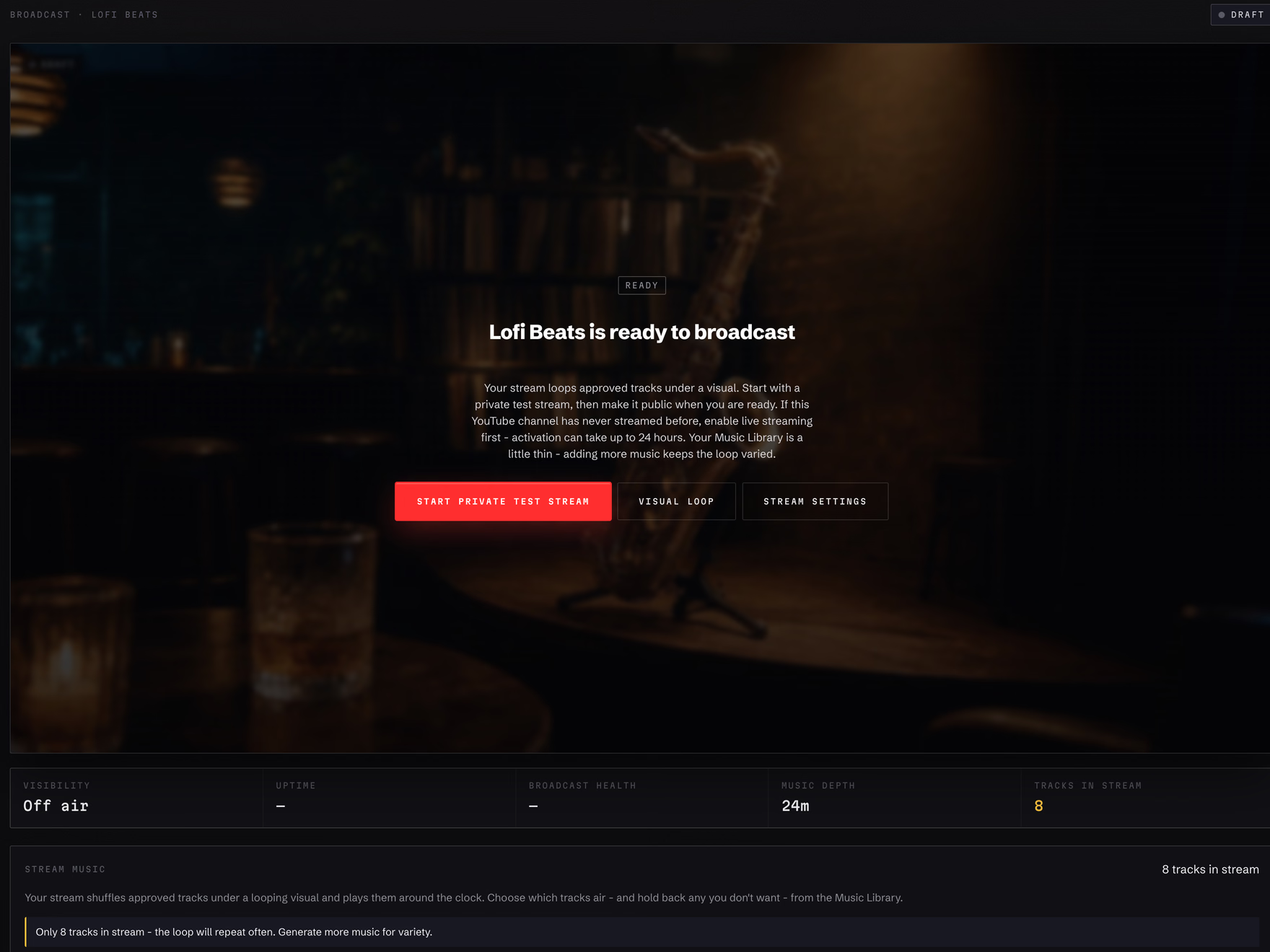
Start private, then go public.

The Broadcast page is the operating room for the stream: launch readiness, visual loop, music depth, YouTube connection, and live controls.

  • Private first. Launch a private test stream, inspect it, then make it public when the channel is ready.
  • One visual loop. The stream runs the music library under one branded loop: uploaded video, image-to-motion, ambient, or AI-generated.
  • Always-on operation. Once running, Marlonica keeps the broadcast alive and shows the operator the state that matters.
Marlonica Broadcast page showing a stream ready to start a private test stream.
03Current Broadcast page

OPERATING MODEL

One stream, one library, clear controls.

Marlonica keeps the product simple on purpose: the Music Library feeds the always-on stream, while the Broadcast page shows launch and runtime state.

Primary path

24/7 YouTube Live stream

A continuous broadcast built from approved tracks and one visual loop. It starts private, then becomes public when you choose.

  • Music Library controls what can air.
  • Broadcast controls launch, status, and public/private operation.
  • Stream settings keep future music and visuals on-brand.
Cost model

Plans include streaming; credits create assets

You pay for stream capacity. Credits are reserved for creation, so a running stream does not silently burn through generation balance.

  • Generate music when the library needs depth.
  • Use free loop paths with uploads, images, or simple ambient visuals.
  • Upgrade when you are ready for public 24/7 operation.

FAQ

Practical questions, plain answers.

The short version: create a stream direction, generate original music, pick a visual, connect YouTube, and start privately before going public.

Stream Setup

What do I need before a stream can start?

You need one stream, at least one approved track in the Music Library, one visual loop, and a connected YouTube channel with live streaming enabled.

Does Marlonica replace YouTube Studio?

No. Marlonica prepares and runs the music stream. YouTube still owns channel verification, live-streaming eligibility, audience analytics, and platform policy decisions.

Can I start privately first?

Yes. The first launch path is a private test stream. You can inspect the broadcast before making it public.

Music And Credits

Do I own the tracks Marlonica creates?

Generated tracks stay in your Music Library for the stream. Approved tracks can keep feeding the broadcast whenever you want to use them.

What uses credits?

Credits are used when Marlonica creates new assets such as tracks, covers, and AI visual loops. Uploads, simple ambient loops, and running the station itself are not metered as generation calls.

Can I keep tracks out of the stream?

Yes. The Music Library lets you keep tracks in the stream or hold them back. That gives you curation without manual playlist machinery.

Broadcast Operation

What happens if my library is thin?

A thin but non-empty library can still launch. Marlonica warns you because the loop will repeat more often, then points you back to generating more music.

What visual does the stream use?

Each stream uses one fixed visual loop. You can upload a video, upload an image and turn it into motion, generate a loop with AI, or use a simple ambient loop.

Can a trial stream go public?

Trial streams are for private evaluation. Paid plans unlock public 24/7 streaming, with plan limits shown on the pricing page.

Need help deciding?

Tell us what you want to stream.

We can help map your channel idea to the right plan, music depth, and first private test stream.